
Business services, in one node.
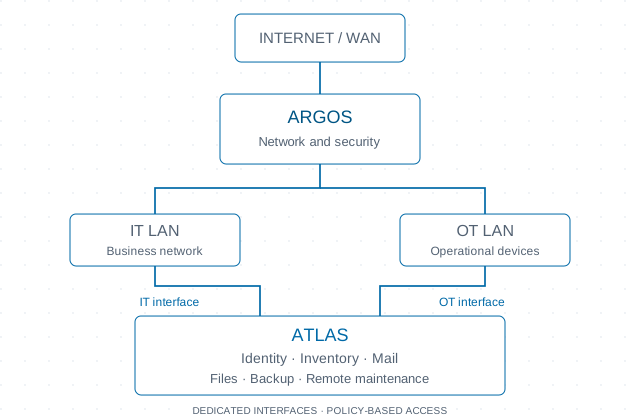
Identity and single sign-on, email, files, private communication, backup and remote assistance. Atlas brings together your infrastructure services.
Business identity and access
Atlas manages domain users, groups, computers, DNS and shares. Optional single sign-on connects the console through OpenID Connect and configured applications through SAML 2.0. Sign-in can use a domain computer ticket, a passkey or a password with a one-time code. Local recovery login remains subject to trusted networks and configuration.
Email, calendars and contacts
Atlas brings together email, webmail, calendars and contacts. The service includes spam and malware filtering, synchronization with compatible clients, mailbox migration and mail sharing. Users access communication tools with a business identity while management stays within their infrastructure.
Chat and private communication
Business chat enables communication in an environment managed by the organization. Atlas provisions accounts from business identities and makes the service accessible to compatible clients. Administrators retain control over access and communication settings.
Telephony and softphone
Business telephony includes extensions, ring groups, automated attendants and call routing. Extensions are linked to directory users, and the software phone also works in the browser. Carrier connections, automatic device configuration and handset compatibility need to be checked in the chosen configuration.
Mobile app: business services away from the office
With the EDON Client app, you can access business services from your phone while away from the office. The app brings together secure network connectivity, business calling, chat, contacts, calendar and the credential vault. The remote connection also lets you reach other authorized services using a browser or compatible clients. Visible features depend on configured services and user permissions. The app is available for Android; the iPhone version is in development.
Files and deduplicated backups, including continuous mode
Atlas integrates file sharing, deduplicated backups and recovery of saved versions. Deduplication avoids storing data blocks already present in the same repository again, reducing the space required by subsequent backups. Alongside scheduled backups, you can enable continuous mode for shared files, with repeated cycles throughout the day. Destinations, retention and notifications are configurable. Effective frequency depends on cycle duration and storage availability; this is not instantaneous replication or a guarantee of zero data loss.
A local operations console
The console brings together service status, metrics, notifications, inventory and device assistance. Administration stays on the appliance, with scheduled or manually initiated updates and reboot controls. The IT team can coordinate maintenance from the same interface.
MCP gateway: AI assistants with controlled access
The MCP gateway connects compatible AI assistants to authorized business tools and information. It can help inspect system status, gather diagnostic information and perform permitted operations without manually copying data between tools. Administrators decide which integrations to enable and which activities to permit: reading, authorized writes or excluded operations. Authentication and access logging maintain control over resource use. APIs also allow metrics, files, backups and other services to be integrated into business automation.
Deployment environment and limits
Atlas brings isolated services, data storage and session management together on the appliance. Sizing, recovery objectives and continuity require checks against the expected workload and configuration. Feature availability is not a hardware benchmark or validation of a high-availability cluster.
Single sign-on and business applications
Configured SAML applications can restrict access by directory group and customize released attributes. Passkeys are registered with the identity service and manageable by the user. Integration requires service-specific configuration; it does not imply universal application compatibility.
Inventory and remote assistance
Atlas provides remote sessions and file operations on authorized devices, plus guest assistance using a code supplied by the assisted person. IT/OT interfaces and reachable networks require explicit permissions. A remote session does not grant unrestricted access to other devices.
Credential vault
The vault manages credentials and secrets with directory-aware permissions, history and encryption of sensitive fields at rest. Values are revealed through an explicit action by an authorized user. This is not a zero-knowledge model: the service enforces authorization and processes secrets for delivery to the recipient.
These capabilities are documented in the source; they are not hardware certifications, benchmarks or availability guarantees. Verify configuration and workload during assessment.
Documented capabilities
Files and deduplicated backups, including continuous mode
Deduplicated backups and continuous cycles for shared files, with configurable retention and recovery.
Chat and private communication
Chat and private communication with accounts linked to business identities.
Credential vault
The vault manages credentials and secrets with directory-aware permissions, history and encryption of sensitive fields at rest.
Business identity and access
Manage business identities, users, groups and service access.
Email, calendars and contacts
Email, webmail, calendars and contacts with spam and malware filtering.
MCP gateway: AI assistants with controlled access
Connect AI assistants to business information and tools with explicit permissions.
Mobile app: business services away from the office
Access business services from your phone, including away from the office. Android available; iPhone in development.
Inventory and remote assistance
Atlas provides remote sessions and file operations on authorized devices, plus guest assistance using a code supplied by the assisted person.
Single sign-on and business applications
Configured SAML applications can restrict access by directory group and customize released attributes.
Telephony and softphone
Extensions, ring groups, automated attendants and browser-based calling.
Control starts with a conversation.
Tell us about your infrastructure. Let’s start with what you actually need.
Talk to an engineer